Agent Download
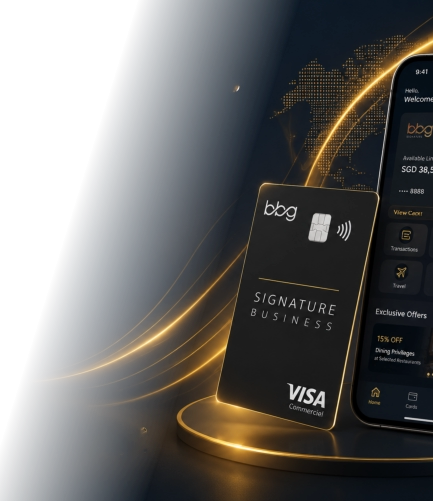
Enjoy seamless entry with BBG Signature.
Get help with digital arrival cards for your next destination.
















AGENT ACCESS
Ready to unlock
a world of privileges?
Join BBG Signature today experience the
perfect blend of financial power. Lifestyle rewards
and global privileges.

BBG Signature is a premium financial ecosystem
designed for members who value exclusivity,
convenience and superior experiences.
QUICK LINKS
SUPPORT
About Us
Airport Lounge
Download App
Card Benefit
Help Center
FAQs
Terms & Conditions
Privacy Policy
CONTACT US


Our Office:
BBG GLOBAL LTD
UNITED KINGDOM (15612669)
UNITED KINGDOM
71-75, Shelton Street, Covent Garden,
London, WC2H 9JQ, United Kingdom
Email: cs@bbgclub.vip
BBG GLOBAL CO.,LTD.
THAILAND (0105567110641)
BBG GLOBAL (M) SDN BHD
Malaysia - 202501010618 (1612032-M)
THAILAND
MALAYSIA
214/2 Soi Na-thong 3,
Ratchadaphiseak Road,
Din Daeng, Bangkok 10400, Thailand
Email: cs@bbgclub.vip
BBG GLOBAL PTE. LTD.
Singapore (UEN 202415009C)
SINGAPORE
68 Circular Road, #02-01,
Singapore, 049422
Email: cs@bbgclub.vip
BBG GLOBAL LIMITED
HONG KONG (77030002)
HONG KONG
Unit 1603, 16th Floor, The L. Plaza,
367-375 Queen’s Road Central,
Sheung Wan, Hong Kong
Email: cs@bbgclub.vip
BBG Global Korea Co., Ltd.
비비지글로벌코리아 주식회사KOREA (571-81-03814)
KOREA
606, 20, Magokjungang 1-ro,
Gangseo-gu, Seoul, Republic of Korea
Email: cs@bbgclub.vip
BBG GLOBAL (CHENGDU)
CHINA (02863100520)
CHINA
中国四川省成都市武侯区天府大道
北段871号新飞翔大厦1002
Email: cs@bbgclub.vip
Suite 61.16, Sky Zone 1, Exchange 106,
Lingkaran TRX, 55188 Tun Razak
Exchange (TRX), Kuala Lumpur, Malaysia
Email: cs@bbgclub.vip
AGENT CLICK TO DOWNLOAD
Here’s a step-by-step guide to help you install the APK I’ve shared with you. Just follow these instructions:
Step 1: Enable Installation from Unknown Sources
Before you can install the APK file, you need to allow your phone to install apps from sources other than the Google Play Store. Here’s how
you can do it:
For Android 8.0 and below:
1.
Open the Settings app on your phone.
2.
Scroll down and tap on Security or Lock screen and security.
3.
Find and toggle on Install from Unknown Sources.
4.
You may also need to select the app (like your browser or file manager) that you will use to open the APK and enable it to install APKs.
For Android 9.0 and above:
1.
Open the Settings app.
2.
Go to Apps & notifications.
3.
Tap Special app access.
4.
Tap Install unknown apps.
5.
Find the browser or file manager app you’ll use (like Chrome or Files), and toggle on Allow from this source.
Step 2: Download the APK File
1.
Click the link below to open the APK file in your phone’s browser:
2.
The file should start downloading. Wait for the download to complete.
Step 3: Install the APK
1.
Once the download is complete, open your Downloads folder or the notification bar.
2.
Tap on the APK file you just downloaded (it should say something like agent.apk).
3.
A prompt will appear asking if you want to install the app. Tap Install.
4.
Wait for the installation to finish.
Step 4: Open the App
1.
Once the installation is complete, you can either tap Open directly from the installation screen, or find the app icon in your app drawer.
2.
Tap the app icon to start using the app!
Important Notes:
If you encounter any issues or receive a warning that the app might harm your device, don’t worry — I’ve personally checked the APK for
security. You can safely continue the installation.
Make sure to turn off the “Install from Unknown Sources” setting after you’re done installing to maintain your device’s security.
Step by step guide: